


A single shared gate code can be copied, photographed, forwarded, or kept by a former worker long after access should end.
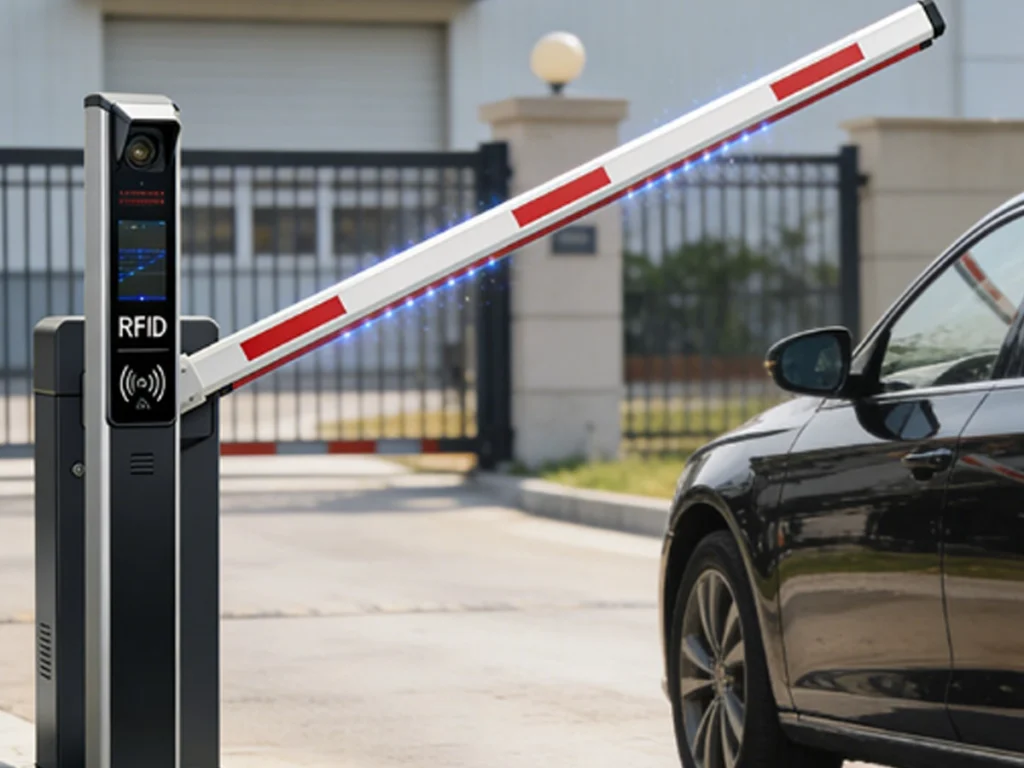
That simple fact explains why many businesses need more than a keypad at their main vehicle entrance.
An automated commercial gate with access control gives each approved user a distinct credential. Therefore, a Dallas property manager can grant access, limit schedules, review activity, and remove credentials without changing access for everyone.
means radio frequency identification. In a commercial gate system, reader detects an approved tag, card, or key fob and sends the request to an access controller.
The controller checks whether the credential is valid. It may also check the day, time, user group, gate location, and current access rules.
When the request meets those rules, the controller signals the automated gate to open.
This process can happen quickly, especially when a windshield tag is read from a vehicle approach lane. As a result, drivers may enter without lowering a window, reaching a keypad, or searching for a remote.
However, is not only a convenience feature.
A complete system can help a business manage employees, vendors, contractors, fleet vehicles, and temporary users through separate credentials and permissions.
It can also create useful entry records. These records may help managers review access activity, investigate unusual events, and confirm when approved users entered.
Still, reader alone does not create a dependable entrance.
The gate structure, operator, controller, network, power source, safety devices, credential database, and emergency access plan must all work together.
Therefore, the most useful question is not whether technology works. The better question is whether the full system has been designed around the property’s real traffic and security needs.
This guide explains
- How commercial gate access works
- Which credentials suit different users
- Why mixed credential systems are often practical
- How schedules and permissions improve control
- What causes delayed or failed reads
- How testing proves full system reliability
AI Overview
An automated commercial gate with access control lets approved vehicles or users enter through individual electronic credentials.
A Dallas business may use windshield tags for fleet vehicles, access cards for employees, key fobs for flexible users, and temporary credentials for vendors.
The best system combines fast entry with individual permissions, access schedules, accurate entry records, and simple credential removal.
However, reliable performance depends on correct reader placement, tested tag positions, stable power, dependable network connections, safe gate operation, and backup access.
The final goal is not simply a successful scan. Instead, the full entrance should remain fast, secure, safe, and dependable during normal business traffic.
A complete system should provide
- Fast credential recognition
- Separate access rights for each user group
- Easy credential activation and removal
- Clear entry records
- Safe automated gate movement
- Reliable backup access
What Is an RFID Commercial Gate System?
commercial gate system combines electronic identification with an automated vehicle gate.
Each approved user receives a credential containing identification data. Depending on the equipment, the credential may be a windshield tag, card, key fob, or temporary tag.
A reader near the entrance detects that credential.
The reader then sends the credential data to an access control panel. The controller compares the data with stored access rules.
The basic process includes
- A credential enters the reader zone
- The reader captures its identification data
- The controller checks permission rules
- The gate receives an opening command
- The event may be saved in an activity record
- The gate closes after safe vehicle passage
systems differ in range and purpose.
Some credentials must be held close to a reader. Others can be detected from several feet away when equipment, tag type, mounting, and vehicle position are suitable.
Therefore, commercial owners should not assume every product offers hands free vehicle entry.
The selected technology should match the approach lane, desired read distance, vehicle speed, credential type, and required level of control.
Why All RFID Benefits Work Better Together
Your first answer selected all major benefits rather than one isolated advantage.
That position reflects how commercial gate access works in practice.
Fast entry helps traffic move. Individual credentials improve accountability. Entry records provide useful history. Meanwhile, removing shared codes reduces a common access weakness.
The combined benefits include
- Faster vehicle entry
- Better employee access control
- More useful entry records
- Less reliance on shared codes
- Easier credential removal
- More flexible user permissions
A business may first consider because vehicles are waiting too long at a keypad.
However, after installation, managers often value the administrative controls just as much as the faster entry.
For example, a former employee’s credential can be disabled without affecting active staff.
Likewise, a contractor can receive limited access for certain days without receiving the same rights as a manager.
Therefore, creates the most value when speed, security, records, and administration are planned together.
Why Shared Codes Create Access Problems
Keypads remain useful for some commercial entrances. Nevertheless, shared codes are difficult to control once many people know them.
A code can be shared with another worker, delivery driver, vendor, friend, or former employee.
Even when a business changes the code, every approved user must receive the replacement.
Shared code problems may include
- No clear link between a person and an entry
- Continued use after employment ends
- Frequent code sharing
- Difficult code changes
- Delays when users forget the code
- Unauthorized entry before discovery
credentials provide individual identity within the access system.
This does not mean they can never be lost, shared, or misused. However, each credential can usually be managed separately.
When a card or tag is reported missing, the manager can remove that credential instead of changing access for every user.
That difference can make daily access administration far easier.
Why a Mixed Credential System Works Best
Your second answer selected a mixed credential system for different commercial user groups.
This is often more practical than forcing every person to use the same credential.
Employees, fleet drivers, managers, contractors, and visitors may approach the property in different ways.
A mixed system may use
- Windshield tags for regular vehicles
- Employee cards for controlled entry points
- Key fobs for flexible staff use
- Temporary tags for contractors
- Mobile or keypad backup for special cases
- Visitor approval through an intercom
A windshield tag can support quick vehicle entry because the user may not need to stop beside a reader.
An employee card may work well when staff members use both a vehicle gate and controlled building doors.
A key fob can be convenient for employees who use several vehicles.
Temporary credentials can serve contractors whose access should end automatically after a project or approved time period.
Therefore, the correct credential should follow the user’s role rather than a one size fits all rule.
Windshield Tags for Fast Vehicle Entry
Windshield tags are often used for regular employees, residents, fleet vehicles, or approved service vehicles.
The tag is placed in a tested position on the vehicle windshield.
As the vehicle enters the read zone, the reader attempts to identify the tag and send the credential request to the controller.
Windshield tags can support
- Hands free vehicle entry
- Faster morning traffic
- Less driver reach
- Fewer keypad delays
- Consistent fleet identification
- Reduced remote control handling
However, windshield materials and coatings can affect radio signals.
Tag placement also matters. A tag that works on one windshield area may perform poorly in another position.
Therefore, each vehicle type should be tested during enrollment.
Drivers should also approach through the intended lane at a controlled speed. A tag should not be expected to work from any angle, distance, or speed.
Access Cards for Employees
access cards can support both gate and building access when the system is designed for that purpose.
An employee may present a card near a reader at the gate or use the same identity within other approved access points.
Employee cards may provide
- Individual user identification
- Department based access
- Scheduled access hours
- Quick credential removal
- Entry activity records
- Consistent company access rules
Cards often require the user to stop and present the credential.
Therefore, they may not provide the same hands free vehicle flow as a long range windshield system.
Still, they can be useful for pedestrian entrances, guard managed lanes, restricted areas, and locations where shorter read range is preferred.
Businesses should also establish a clear process for lost cards. The credential should be disabled quickly and replaced through an approved method.
Key Fobs for Flexible Staff Use
Key fobs provide a compact credential that users can carry on a key ring.
They may suit supervisors, maintenance teams, staff members who change vehicles, or users who need access at several controlled points.
Key fob advantages include
- Easy daily carrying
- Use across different vehicles
- Individual assignment
- Quick replacement
- Simple removal from the system
- Familiar user experience
However, a key fob can be passed to another person.
Therefore, the business should pair technical controls with clear credential policies.
Users should know that credentials are personal, should not be shared, and must be reported when lost.
Activity records can help identify unusual use, but management procedures remain essential.
Temporary Credentials for Vendors and Contractors
Vendors and contractors often need legitimate access without receiving permanent employee permissions.
An RFID system can support temporary credentials that expire after a set date or approved project period.
Temporary access can be limited by
- Start and end dates
- Days of the week
- Approved hours
- Specific gate locations
- User role
- Project duration
This approach can reduce the number of active credentials that remain in the system after work ends.
For example, a contractor may receive weekday access during normal service hours. The credential can then expire automatically after the approved period.
However, managers should still review temporary credential lists.
Projects may end early, staff may change, or a credential may be lost before its expiration date.
Why Unified Access Features Matter
Your third answer selected all key access management features.
These features include schedules, rapid activation, credential removal, entry records, and separate permissions.
Their value increases when they operate through one organized process.
Unified management should support
- Individual access schedules
- Fast credential activation
- Immediate credential removal
- Detailed activity records
- Separate group permissions
- Clear administrator roles
A system that creates detailed records but makes credential removal difficult is incomplete.
Likewise, a system with fast enrollment but poor user grouping can become difficult to manage as the business grows.
Therefore, Dallas property managers should evaluate administration before choosing hardware.
The daily user interface matters because access data must remain accurate over time.
Individual Access Schedules Improve Control
An access schedule defines when a credential may open the gate.
Employees can receive access during their normal shifts. Managers may receive broader access, while contractors may be limited to approved service periods.
Schedules can help control
- Early morning entry
- Evening access
- Weekend access
- Holiday access
- Temporary projects
- Special events
Schedules reduce the need to leave every credential active at all times.
However, they should reflect real business needs. Rules that are too strict may cause repeated denied entries and staff frustration.
Therefore, managers should review shift patterns, overtime, deliveries, and emergency procedures before setting schedules.
Changes should also be documented so administrators understand why broader access was granted.
Fast Credential Removal Protects the Property
Credential removal is one of the most practical advantages of individual access.
When an employee leaves, a tag is lost, or a vendor contract ends, that credential can be disabled.
Quick removal helps address
- Staff departures
- Lost credentials
- Stolen vehicles
- Contractor changes
- Misuse concerns
- Expired access needs
The removal process should not depend on one unavailable administrator.
Businesses may need more than one trained manager, with clear rules about who can add, change, or remove credentials.
Administrative accounts should also be protected.
An access system can only remain dependable when its user list and administrator rights are managed carefully.
Entry Records Support Better Oversight
RFID access systems can create records showing when a credential was accepted or denied.
Depending on the system, records may include the credential identity, gate location, date, time, and access result.
Entry records may help managers
- Review unusual activity
- Confirm vendor arrival
- Check repeated denied entries
- Investigate reported incidents
- Understand peak traffic
- Audit active credentials
These records should not be treated as proof of a person’s full activity on the property.
A valid credential event shows that a credential was used. It does not always prove who held it or what happened after entry.
Therefore, records are most useful when combined with clear credential policies, video systems, guard observations, or other site controls.
RFID Access and Commercial Gate Safety
controls who may request entry. The gate operator controls physical movement.
These are connected functions, but they are not the same.
UL Solutions explains that UL 294 provides a testing and certification framework for access control system units. It addresses performance and function for devices used in access control applications.
UL also explains that automated gate operators are covered by UL 325, which addresses hazards that include electric shock, casualty, fire, and entrapment.
A complete installation should consider
- Access control performance
- Operator safety requirements
- Entrapment protection
- Vehicle detection
- Gate construction
- Emergency release
UL notes that access control equipment and gate operators may work together while serving different certification purposes. UL 294 addresses access control equipment, while UL 325 addresses the automated operator and related safety functions.
Therefore, a successful read should never bypass safe gate movement.
Why Reader Range Must Match the Site
Reader range describes the practical area where an credential can be detected reliably.
The required range depends on whether vehicles should stop, slow, or continue through a controlled approach.
Reader range depends on
- RFID technology
- Antenna direction
- Reader placement
- Vehicle position
- Tag type
- Nearby metal or interference
A reader with too little range may force drivers to stop closer than expected.
A reader with poorly controlled range may detect credentials from an adjacent lane or nearby parking area.
Therefore, longer range is not always better.
The goal is a stable read zone that matches the correct lane and approach point.
Vehicle Position Can Cause Failed Reads
Your fourth answer selected every major installation factor, including reader placement and vehicle position.
A driver may assume the credential is faulty when the real issue is lane alignment.
The vehicle must enter the area where the reader and tag can communicate.
Position problems may include
- Stopping too far from the reader
- Approaching at the wrong angle
- Using an adjacent lane
- Placing the tag incorrectly
- Moving too quickly
- Blocking the tag with metal
Clear lane markings and signs can help drivers use the system correctly.
The installer should also test passenger cars, trucks, vans, and other common vehicles used at the property.
A setup that works for one vehicle height may need adjustment for another.
Network and Controller Reliability
Modern access control systems may use local networks, cloud services, or communication links between readers and controllers.
However, the gate should have a clear operating plan if one connection becomes unavailable.
Reliability planning should review
- Local controller operation
- Network availability
- Communication cables
- Cloud dependence
- Event storage
- Administrator access
Some systems may continue making local access decisions when an outside connection is lost.
Others may lose certain management features while basic access continues.
The exact behavior depends on the system design. Therefore, the property manager should understand which functions remain available during an outage.
Power and Backup Access
An automated gate, controller, reader, network device, and safety equipment all require dependable power.
A power loss can affect several parts of the entrance at once.
Backup planning may include
- Battery support
- Generator supplied circuits
- Manual gate release
- Guard controlled entry
- A secondary credential method
- Written emergency procedures
Backup equipment must be tested.
A battery that has not been checked may provide less runtime than expected. Likewise, a manual release is not useful when authorized staff cannot locate the key or procedure.
Therefore, backup access should be treated as a normal operating requirement rather than an emergency afterthought.
How RFID Helps Commercial Traffic Flow
can reduce the time spent entering a code or waiting for staff approval.
This is especially useful where many known vehicles enter during a short period.
Faster RFID entry can reduce
- Morning employee queues
- Driver reach problems
- Repeated keypad errors
- Guard workload
- Idling near the entrance
- Delays for approved fleets
However, gate opening speed, vehicle detection, and road layout also affect traffic.
A fast read cannot correct a slow gate, narrow approach, poor queue area, or unsafe vehicle path.
For broader commercial planning, Dallas decision makers can review how commercial gate upgrades can improve business security.
How RFID Supports Employee Management
gives managers more control over active user lists.
New employees can receive credentials during onboarding. Departing employees can have credentials removed during offboarding.
A strong employee process should include
- Verified credential assignment
- Clear access groups
- Approved schedules
- Lost credential reporting
- Immediate offboarding removal
- Regular user audits
The technology supports the process, but it does not replace management.
An active list can become outdated when no one reviews transfers, departures, role changes, or unused credentials.
Therefore, access control should be part of routine security administration.
How RFID Supports Vendors and Deliveries
Commercial properties often need to admit vendors without granting unrestricted access.
A supplier may arrive every weekday, while a repair contractor may need access for only three days.
Vendor controls may include
- Limited schedules
- Expiring credentials
- Approved gate locations
- Separate vendor groups
- Entry records
- Manual approval for exceptions
Some visitors may still need an intercom or call entry process.
works best for known and repeat users. Unplanned visitors often require identity confirmation and human approval.
Businesses considering layered visitor access can review intercom options that improve screening at the entrance.
Testing Approved and Blocked Credentials
A full system test should confirm that approved credentials work and blocked credentials do not.
Testing only successful entry does not prove that the system can enforce denial rules.
Credential testing should include
- An active employee credential
- A credential outside its schedule
- A disabled credential
- An expired temporary credential
- A credential assigned to another gate
- A lost credential removed from the system
The system should record the result accurately.
Administrators should then confirm that the activity appears in the correct account or report.
This process checks both field equipment and database rules.
Testing the Full Gate Cycle
Your fifth answer defined the final goal: the full system should remain fast, secure, and reliable during normal business traffic.
Therefore, testing must continue after the reader accepts a credential.
A complete cycle test should confirm
- The credential reads correctly
- The controller grants or denies access
- The operator opens smoothly
- The vehicle detection system works
- Safety devices respond correctly
- The gate closes and secures
The gate should be tested through repeated cycles.
This helps reveal intermittent reads, delayed commands, heat related problems, weak power, or movement changes during heavier use.
The operator should also remain aligned and smooth throughout testing.
Common Causes of Access Delays
access delays may come from the credential, reader, controller, network, operator, or gate structure.
Therefore, replacing a tag without diagnosis may not solve the problem.
Common causes include
- Poor tag placement
- Reader misalignment
- Weak communication links
- Incorrect access schedules
- Slow controller response
- Mechanical gate resistance
A driver may report that the system is slow when the credential is accepted quickly but the gate operator starts late.
Event records and field observations can help separate the access decision from the physical movement.
A structured inspection is more effective than guessing. Dallas businesses can review what happens during a professional gate diagnostic service.
Common RFID Management Mistakes
Even strong hardware can underperform when administrative practices are weak.
A business may issue credentials without assigning clear names, groups, or expiration dates.
Common management mistakes include
- Shared credentials
- Missing user names
- No removal process
- Excess administrator access
- Permanent vendor credentials
- No regular database review
Each credential should have a clear owner or approved purpose.
Managers should also review inactive credentials and access groups on a planned schedule.
Good record keeping makes future audits and troubleshooting easier.
Protecting RFID Credentials
credentials should be treated as access keys.
Users should not lend them, leave them in unsecured vehicles, or attach them to unapproved property.
Credential policies should explain
- Who owns the credential
- Where it may be used
- Whether sharing is prohibited
- How loss must be reported
- When access ends
- What happens after misuse
The correct technical protection depends on the equipment and security needs.
Commercial buyers should ask how credentials, readers, controllers, and communications are protected within the proposed system.
UL 294 provides a recognized framework for access control equipment evaluation, including reliability and functional performance considerations.
Maintenance for RFID Gate Systems
systems need both physical and digital maintenance.
The gate hardware and operator require inspection. Meanwhile, readers, credentials, user records, networks, and backup equipment require review.
Physical maintenance should include
- Gate alignment
- Operator brackets
- Safety sensors
- Reader mounting
- Wiring and enclosures
- Backup batteries
Administrative maintenance should include
- Active credential review
- User group checks
- Schedule updates
- Administrator account review
- Entry record checks
- Vendor credential cleanup
Dallas businesses can use these commercial electric gate care tips when planning routine service.
Dallas Planning and Permit Considerations
Commercial gate work may involve structural, electrical, site, or access changes.
The City of Dallas states that commercial permits authorize qualifying construction, alteration, and renovation work. The process helps verify compliance with local codes, zoning rules, and safety standards.
Project planning should review
- Gate location
- Vehicle queue space
- Electrical work
- Emergency access
- Property and zoning limits
- Current permit requirements
The required approvals depend on the property and project scope.
Therefore, owners should confirm current Dallas requirements before beginning installation or major alteration.
A Practical RFID Installation Process
A dependable project begins with business needs rather than a product list.
Study the traffic
- Count daily vehicle entries
- Identify peak arrival times
Define user groups
- Separate staff, fleet, vendors, and visitors
- Decide which credentials fit each group
Inspect the entrance
- Review lanes, gate type, power, and network access
- Check reader range and vehicle positions
Design access rules
- Set schedules and permissions
- Plan activation and removal procedures
Install the system
- Mount readers and controllers
- Connect the gate and safety equipment
Enroll credentials
- Assign every credential clearly
- Test each vehicle and tag position
Test normal traffic
- Run repeated entry cycles
- Confirm approved and denied access
Train administrators
- Explain user management
- Review backup and emergency access
Schema Ready Questions and Answers
What is an automated commercial gate with RFID access control?
It is a powered vehicle gate connected to an access system that identifies approved tags, cards, or key fobs. The controller checks each credential against stored permissions. When access is approved, the system sends an opening command to the gate and may record the event.
What is the main benefit of RFID gate access?
combines faster vehicle entry with individual credential management. Businesses can reduce shared codes, assign schedules, remove lost credentials, separate user permissions, and review access records. The greatest value comes when these benefits work together within one reliable gate and access control system.
Which credential is best for commercial properties?
No single credential suits every user. Windshield tags may work best for regular vehicles, while cards or key fobs can support employees who use several entrances. Temporary tags can serve contractors. A mixed credential system often provides the most flexible and practical solution.
Can credentials have different access schedules?
Yes. Many commercial access systems allow managers to assign schedules by user, role, gate, day, or time. Employees may receive shift based access, while contractors receive limited hours. The available features depend on the selected controller, software, configuration, and credential system.
Can a lost RFID credential be disabled?
A properly managed system should allow an authorized administrator to disable a lost credential. This is a major advantage over shared codes. The business should have a clear reporting process so lost cards, tags, or key fobs can be removed before another person uses them.
Does an RFID gate keep entry records?
Many access systems can record accepted and denied credential events. Records may include the credential, gate, date, time, and access result. However, a record confirms credential use rather than proving who held it. Businesses should combine records with sound policies and other security tools.
Why do RFID tags sometimes fail to read?
Failed reads may result from poor tag placement, vehicle position, reader angle, radio interference, damaged credentials, controller issues, network problems, or access schedules. A full test should examine the credential, reader, access rules, communication path, gate operator, and vehicle approach.
Does an RFID commercial gate need backup access?
Yes. Businesses should plan for power loss, controller trouble, network failure, damaged credentials, and gate operator problems. Backup may include batteries, manual release, guard access, an alternate credential method, or a written emergency procedure. Every backup option should be tested regularly.
How should an RFID gate system be tested?
Testing should include active, blocked, expired, and out of schedule credentials. Technicians should also test reader range, vehicle position, gate movement, safety devices, closing action, power backup, and entry records. Repeated tests under normal traffic provide stronger evidence of reliability.
secure for commercial gate access?
RFID can improve commercial access control by replacing shared entry methods with individual credentials. However, security depends on the selected technology, equipment, configuration, credential management, administrator controls, and user policies. Businesses should evaluate the full system rather than relying on the label alone.
Conclusion
An automated commercial gate with access control can improve far more than entrance speed.
It can give Dallas businesses individual credentials, separate permissions, access schedules, useful records, and faster credential removal.
However, these benefits should work together.
A long range tag offers little value when vehicle position causes failed reads. Likewise, detailed entry records provide limited value when former employees remain active in the system.
Therefore, the strongest entrance combines careful planning, correct equipment, user group design, reader testing, safe gate operation, and clear management procedures.
Your five answers support that full system approach.
First, speed, control, records, and reduced code sharing should operate together.
Second, businesses should use mixed credentials because employees, vehicles, vendors, contractors, and managers have different access needs.
Third, schedules, activation, removal, records, and permissions should be managed as one organized process.
Fourth, reader range, network reliability, tag placement, power, and backup access must all be tested.
Finally, the system should remain fast, secure, and reliable during normal business traffic.
Everlast Gates & Fence helps Dallas decision makers connect the gate, RFID reader, credentials, controller, operator, safety equipment, and management process into one practical commercial entrance.
Contact Everlast Gates & Fence
Improve commercial access with a system designed around your traffic, users, security needs, and daily operations.
At Everlast Gates & Fence, we also offer reliable gate and fence services tailored to residential and commercial properties. Specializing in installing, repairing, and maintaining iron and wood gates and fences along with expert solutions for electric gates, automatic gates, sliding gates, and driveway gates. We also provide professional gate diagnostics, access control systems, customized designs, and comprehensive security enhancements to meet your unique needs. Visit our page at Everlast Gates & Fence, and let us ensure your gates are in expert hands so you can enjoy safety, style, and convenience with complete peace of mind.
Contact Everlast Gates & Fence for automated commercial gate and access control planning, installation, testing, maintenance, and repair in Dallas.
Phone: (469) 212-1925
Location: 2043 Empire Central Dr Suite 108, Dallas, TX 75235
